Create your Ommify workspace
Enter your details, confirm your email with an OTP, and continue into your free workspace.
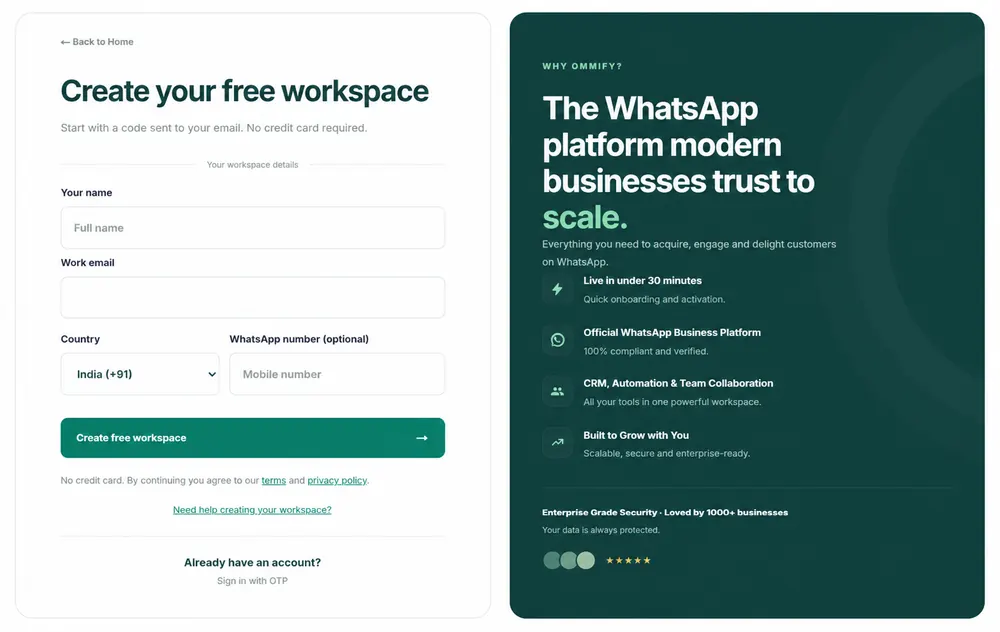
Follow these steps
1
Select Start free or Sign Up.
2
Enter your name, work email, and optional WhatsApp number with its country code.
3
Select Create free workspace to receive a six-digit email code.
4
Enter the code and follow the on-screen onboarding redirect.
Tutorial video
Common issues
Email is required
Enter a valid work email address.
OTP does not work
Use the newest code from your inbox or request another code.
FAQs
Do I need a credit card?
No credit card is required for the current free workspace flow.
Can I register with social sign-in?
The active registration flow uses email and OTP.