Log in to Ommify
Use email OTP or an available social sign-in option to open your workspace.
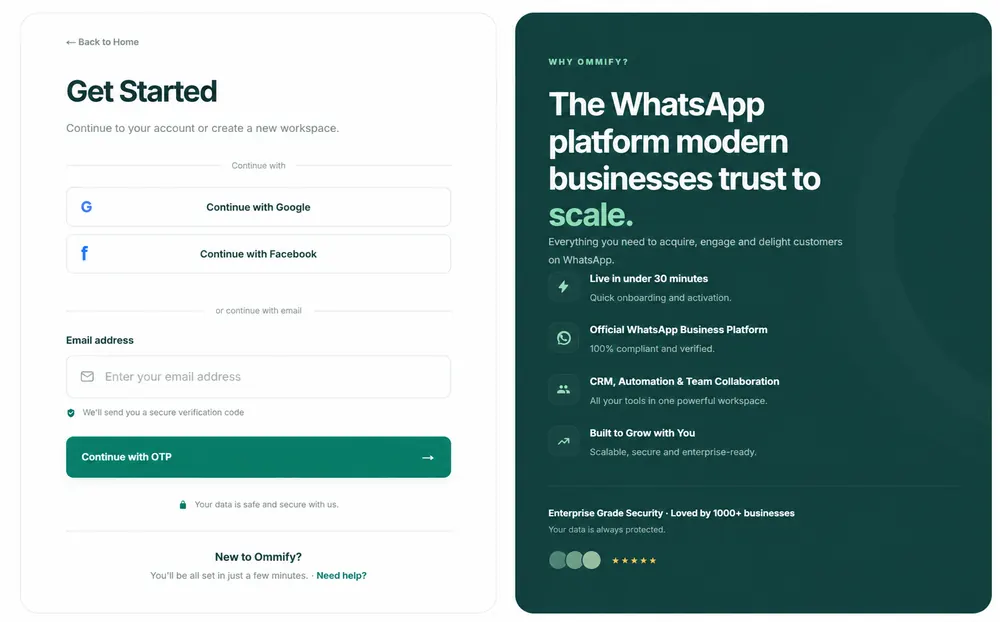
Follow these steps
1
Open Login from the website header.
2
Continue with Google or Facebook, or enter your Ommify email address.
3
Select Continue with OTP to receive a six-digit code by email.
4
Enter the newest code and select Verify and Login.
Tutorial video
Common issues
No OTP received
Check spam, confirm the email address, and use Resend OTP.
Invalid or expired code
Request a fresh code and enter the newest six-digit code.
FAQs
Can I use a password?
The current website login flow is OTP-first.
Can I use Google or Facebook?
Yes, when those options are available on the Login page.